Ages, teen accounts and Adults only Spaces
Why KeyUp asks your birth year, what is different for people under 18, and how to keep a Space to adults.
You must be 14 or older. KeyUp keeps only your age group, never the year. People under 18 have teen accounts: they can’t start a Space, join an Adults only (18+) Space or use the AI assistant, and only friends can start messages and calls with them (once a teen messages someone first, that person can reply).
Why we ask your birth year
- You give your birth year once, when you create the account (or when an Adults only Space asks you to confirm it). An account with no age on file confirms its birth year once, the first time it uses the assistant or opens an account pass (a link from a Space with a member under 18). After you answer, the join goes through again by itself, also if you are under 18.
- An answer under 14 blocks sign-up on that phone or browser for 24 hours.
- On Android, KeyUp also uses the age range Google Play shares and, where a state law requires it, a parent’s approval. The range only makes the rules stricter and never treats anyone as older, and KeyUp doesn’t keep it. In some US states, new accounts for people under 18 aren’t possible for now. See Age checks, state laws and parent approval.
- Accounts made before October 4, 2026 by people who were 13 stay open as teen accounts.
Teen accounts
KeyUp is for people 14 and older. Accounts for people under 18 are teen accounts, with extra protections that are always on.
- Messages and calls from friends only. Someone who isn’t a teen’s friend can’t start a direct message, a direct call or an Ask to join with them. They see: “This person can only get messages and calls from friends. Send a friend request first.”
- Once a teen sends someone a message, that person can reply in that chat and can ask the teen to join a room.
- A block either way ends all of it: after a block, the other person can’t message, call or ask the teen to join, even in a chat the teen started.
- Teens can still accept or decline friend requests, and start messages and calls themselves.
- Not shown to strangers. Teens who aren’t your friend don’t appear in the list of people you can message.
- Spaces by invite only. Teens join a Space only when someone invites them, can’t start or own a Space, and can’t buy a plan.
- No anonymous guest passes in a Space with a teen. While a member is under 18, the Space makes no guest passes that work with just a name, and no links that more than one person can use without an account. It can make an account pass instead: a pass that needs a KeyUp account (so the birth year is known), for at most 24 hours and for up to 5 people. Only the owner or an admin can make one, and a member link is not possible there: A Space with a member under 18 can’t make a link that adds members. Make a pass that ends instead. A member link made earlier stops working too. A kid you know can join for a day, and a stranger with no account cannot. People who open the pass see This Space has members under 18., and the owner and admins get a notification on their phones, Sam joined Riverside Crew with a pass., when someone uses it (also when KeyUp is closed). A moderator doesn’t get the account pass button there: the invite sheet says Only the owner or an admin can make an account pass in a Space with a member under 18. A guest pass made before the teen joined stops working while they are a member. Inviting a friend as a member works as before. See Guest passes.
- Before a teen joins a Space that has guests, KeyUp asks. When an owner or admin keeps a guest who asked to stay, adds someone by username or approves an invitation, and that person is under 18 while the Space has guests, KeyUp asks first: This Space has 3 guests. Adding someone under 18 ends their passes. Continue? Afterwards the owner and admins get a notification, like 2 guest passes ended in Riverside Crew because a member under 18 joined, with a line for members who have not confirmed their age yet, and each guest sees Your guest pass ended because this Space now has a member under 18. An account pass keeps working, because that person’s birth year is known. A plain pass ends even when the guest opened it with a KeyUp account. Nobody is removed without a word.
- No Adults only Spaces. Spaces marked Adults only (18+) are closed to teens and hidden from them.
- No AI assistant. The assistant is for people 18 and over. Teens don’t see Ask AI, and what they say in a room is never sent to the assistant. They still hear the room, including the assistant’s answers to others.
- No own transcription key. A Space with a member under 18 can’t send transcripts to its own provider. It uses KeyUp’s own transcripts, so a teen’s voice never goes to an outside provider.
- Room talk and room chat work as usual inside the Spaces a teen was invited to.
- Google sign-in is fine. A teen can sign in with Google like anyone else. They still give a birth year, and every protection above stays on. See Sign in with Google.
Adults only (18+) Spaces
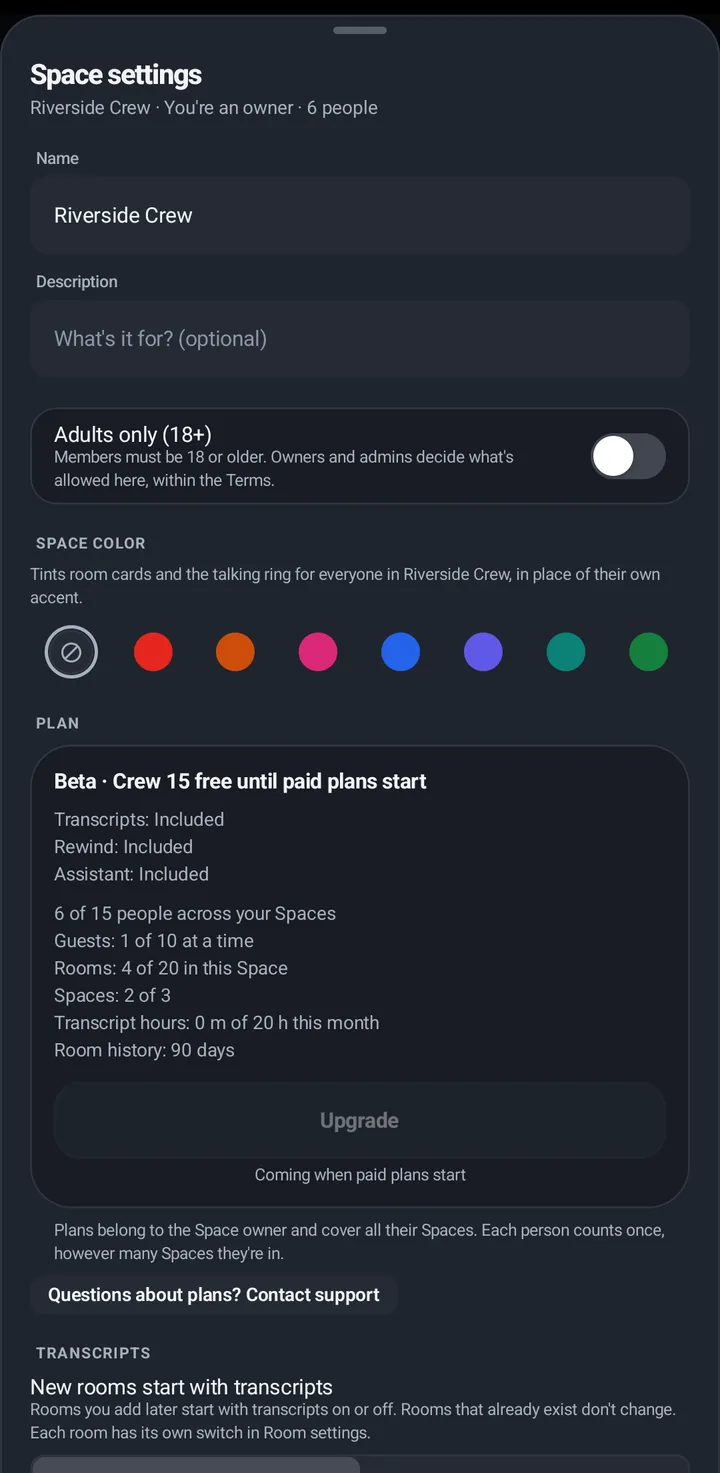
A Space can be set to Adults only (18+). People already inside confirm once: an account gives its birth year, a guest taps I’m 18 or older. Teen accounts can’t be in an Adults only Space. Adults only Spaces allow adult language and mature topics. Sexually explicit content, nudity and sexual services are not allowed anywhere on KeyUp, in these Spaces too.
Phone
- Owners and admins: Space settings › Adults only (18+).
- Members see the card This Space is Adults only (18+) in Your rooms, with Confirm birth year.
Watch
The same card shows at the top of the Rooms list. New Space has the switch.
Web app and iPhone
The switch is in New Space. A birth-year sheet opens when a Space needs it. There is no switch for an existing Space on the web.
Still stuck? Email [email protected]. Tell us your phone and watch model and what you tried.