Billing: buy, change or cancel your plan
How billing works, how to buy or change a plan, what happens when you cancel or a payment fails, and how to turn features back on.
Free is the default, and you are only charged if you choose a paid plan and confirm the payment. The Space owner buys one plan that covers all their Spaces. Invited members and guests never pay. Only adults (18 and over) can buy a plan. A paid plan renews automatically every month or every year, at the same price, until you cancel.
Buy a plan
On Android you pay through Google Play. On the web you pay through Stripe. We never see your card number, and our pages never ask for one.
Phone
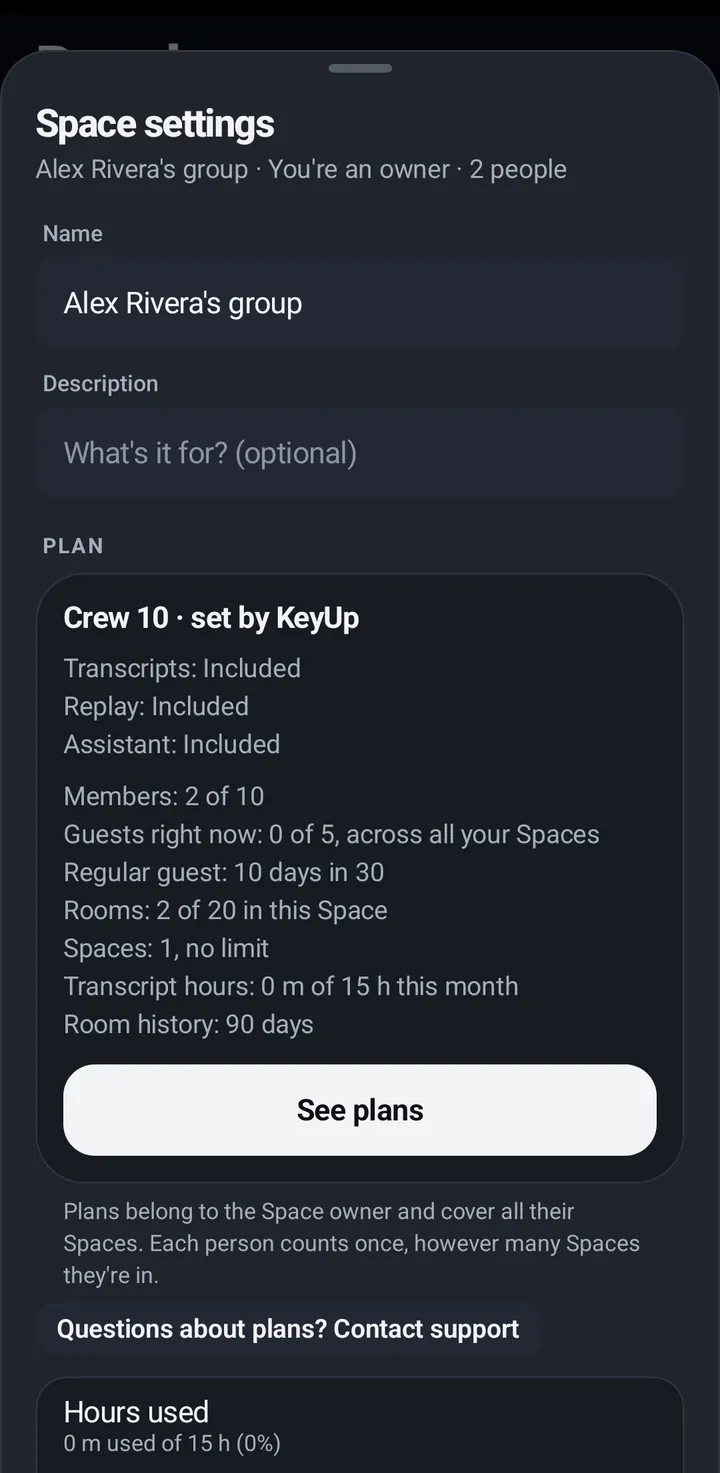
- Open Space settings › Plan and tap See plans.
- Pick Monthly or Yearly (a year costs about ten months on Crew plans, and less on Plus and Plus 10), pick a plan, and tap Buy. Google Play opens its own payment sheet.
- When the purchase is done the card says which plan you are on. If it says Finishing your purchase, wait a moment. Your purchase is safe.
- Changed phone or reinstalled? You › Account and plan › My plan › Restore purchases brings your plan back.
Watch
You can’t buy on the watch. Change the plan on your phone.
Web app and iPhone
- In the web app, tap Plans at the top. This works the same in Safari on an iPhone: the web app is the web, and it sells plans through Stripe. The KeyUp iPhone app sells nothing.
- Pick Monthly or Yearly, pick a plan, and choose Buy. Before you pay, KeyUp shows the price, the period, that the plan renews until you cancel, and where to cancel (Manage billing). You go to Stripe’s secure page to pay, then come back to KeyUp. Business is bought here too, monthly or yearly.
- After you buy, Space settings › Plan shows the next date, like Renews on November 25, 2026. We also email you a confirmation with the plan, the price, the period and how to cancel.
One subscription at a time
You can have a plan from Google Play or from the web, not both at once. If you already pay one way, KeyUp says You already have a plan from Google Play (or the web) and shows where to manage it. Plans renew automatically every month or every year, at the same price, until you cancel.
Where you bought is where you manage it: the Google Play subscriptions page on Android, Manage billing on the web.
When a trial or plan ends
When a trial or paid plan ends, the people over the Free limit are paused until the owner upgrades or makes room. Nothing is deleted. Paused people stay members and stay in the lists, marked paused, but can’t talk, listen or read history in that Space. The last people who joined are paused first, never the owner. Rooms and Spaces over the new limits go read-only, with their content kept. The owner sees a banner with Keep everyone and Choose who is paused. On the phone you can close it with the X in the Talk room and on the People tab. It comes back when the people who are paused change, and Space settings always keeps it. On Free it says, for example, Your plan ended. Free is 3 people; Dana and Lena are paused. Keep everyone with Plus. (or Your trial ended.). After a change to a paid plan with fewer people, for example from Plus 10 to Crew 6, it says Your plan changed. Crew 6 is 6 people; Dana and Lena are paused. Keep everyone with Crew 10. The free 14-day Crew 15 trial needs no card and never turns into a charge. When it ends, KeyUp suggests the smallest plan that covers what your Space used, and the other plans stay listed. No account gets a special price: there is no separate beta or introductory offer.
Upgrade and everyone is un-paused at once. Or make room: when someone leaves, the person paused longest comes back. The owner can also choose who stays.
If a payment fails
Your plan stays for 7 days while Google Play or Stripe tries again, and we show you what to fix. If the payment still hasn’t worked after that, the plan pauses and your Space works as Free until it is paid: the people over the Free limit are paused, and nothing is deleted. When the payment works, your plan comes back. KeyUp shows a banner that says what to fix, like Your payment didn’t go through.
Fix it in Google Play (Android purchases) or under Manage billing (web purchases).
Refunds
On the web, ask within 7 days of the first payment of a plan and we refund it. A web refund or a dispute ends the plan at once. For Google Play purchases, refunds go through Google Play: Google lets you ask for a refund yourself in Google Play within 48 hours of a purchase, and after that, write to us within 7 days of your first payment and we refund it through Google Play. If a plan renewed and you did not mean to keep it, write to us within 7 days of the renewal charge. The full text is on the refund policy page.
Email [email protected] from the email on your KeyUp account.
Cancel or change your plan
You can cancel at any time, and canceling is as easy as signing up. Plans renew automatically until you cancel. Your plan stays until the end of the period you paid for, then your Space goes back to Free. The people over the Free limit are paused until you upgrade or make room, and nothing is deleted.
Cancel
Phone
- If you bought on Android: open Space settings › Plan and tap Manage subscription. It opens the Google Play subscriptions page, where you cancel.
- You can also cancel in the Google Play app: Payments and subscriptions › Subscriptions › KeyUp.
Web app and iPhone
- If you bought on the web: open Space settings › Plan and choose Manage billing. It opens Stripe’s page, where you cancel, change the card or see invoices.
- Or email [email protected] and we cancel it for you.
Change to a bigger or smaller plan
- On Android, open Space settings › Plan › See plans and pick the plan you want. In the web app, tap Plans at the top and pick the plan you want.
- If the new plan has room for fewer people than you have now, KeyUp asks first: Some people will be paused. It names each person and their Spaces, like Sam (Crew), and says whether they are paused now or when the new plan starts at your renewal. Tap Change anyway to go on to Google Play or Stripe, or Cancel to change nothing.
- You can move to a bigger or a smaller plan at any time. An upgrade starts right away, and the difference for the rest of the current period is charged then. A downgrade starts at your next renewal, nothing is refunded, and you can undo it before that date. A plan from Google Play is changed in Google Play; to move to a web plan, cancel it in Google Play first.
- Nothing is deleted when your plan gets smaller.
Turn features back on after a plan change
When a plan loses a feature (for example, a trial or paid plan ends and a Space falls to Free), KeyUp switches it off in every room and remembers which rooms had it. When the plan includes it again, nothing turns on by itself.
Phone
- A sheet says Your plan includes transcripts again. Turn them back on in: (or Replay, or the AI assistant), with every room ticked.
- Untick rooms you want to leave off, then tap Turn on, or Leave off.
- Put the sheet away? It comes back from Space settings › Plan › Turn features back on in your rooms.
Watch
Phone only.
Web app and iPhone
Phone only.
Still stuck? Email [email protected]. Tell us your phone and watch model and what you tried.