Your privacy switches
Voice and AI choices are off until you turn them on: Save and transcribe my voice, Ask the AI by voice, and crash reports. What each one agrees to, and what a Space’s own key changes.
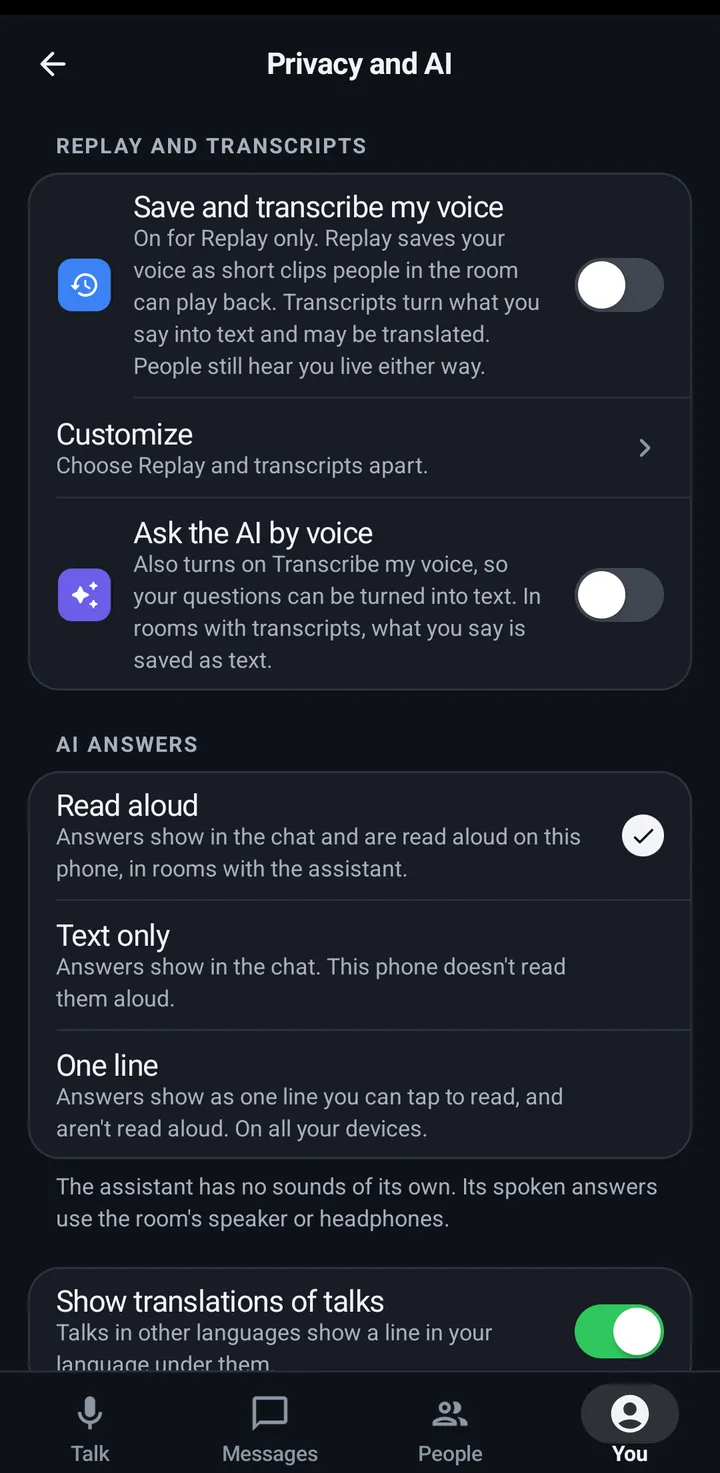
Each switch is saved on your account. Save and transcribe my voice covers both effects: Replay saves your voice as short clips people in the room can play back, and transcripts turn what you say into text and may be translated. People still hear you live either way. Turning on Ask the AI by voice also turns on Transcribe my voice, because a question is turned into text, and turning Transcribe my voice off turns Ask the AI by voice off. Both say so when it happens. Guests are never recorded or transcribed.
Your two switches
Phone
You › Privacy and AI: Save and transcribe my voice (with Customize inside for the two halves, Save my voice for Replay and Transcribe my voice), Ask the AI by voice, AI answers and Show translations of talks. Advanced has Show when I’m away, Send read receipts and Send crash reports.
Watch
Settings › You › Privacy: the same switches. The two halves apart and Show when I’m away are under Advanced. The web app has no crash reports switch (it sends none; use Report a problem).
Web app and iPhone
You › Privacy and AI: Save and transcribe my voice (Customize under it has the two halves apart), Ask the AI by voice, AI answers as one line and Show translations of talks. Advanced has Show when I’m away and Send read receipts. The web app has no crash reports switch (it sends none; use Report a problem).
AI and privacy
The assistant hears you only if you turn on Ask the AI by voice. It is one switch with the same name on the phone, the watch and the web. Questions go to the AI company your Space owner connected. KeyUp has no AI of its own for customers. The assistant is for people 18 and over, and what teen accounts say in a room is never sent to it.
Phone
You › Privacy and AI › Ask the AI by voice.
Watch
Settings › You › Privacy › Ask the AI by voice.
Web app and iPhone
You › Privacy and AI › Ask the AI by voice.
Crash reports
Crash reports send technical details and audio diagnostics (when a talk couldn’t start or a connection dropped). They never send audio, messages or anything you type.
Phone
You › Privacy and AI › Advanced › Send crash reports. It is also asked once in first-time setup, under the Notifications step. It starts off.
Watch
Settings › You › Privacy › Send crash reports.
iPhone
- In the iPhone app (in private testing), You › Privacy › Advanced › Send crash reports. It is also asked once in first-time setup, on the last permission step. It starts off, and it turns audio diagnostics on or off with it.
- If it says Crash reports are not set up in this build., your choice is saved and nothing is sent.
Web app and iPhone
The web app sends no crash reports, in a browser or on an iPhone, so there is nothing to switch. Report a problem is under You › Help.
Still stuck? Email [email protected]. Tell us your phone and watch model and what you tried.