Call for help: alert the people who look after your Space
Press and hold for 2 seconds and the people who look after your Space get a loud alert, even on Quiet.
Call for help sends a loud alert, with an optional short note, to the people who look after your Space. It goes through Quiet, mutes and notification levels. If the room has Replay on and you agreed to it, they can also hear your last talk from the past minute. It is not a call to emergency services, and every screen that sends one says so: Not an emergency service. Call your local emergency number first.
Call for help
Phone
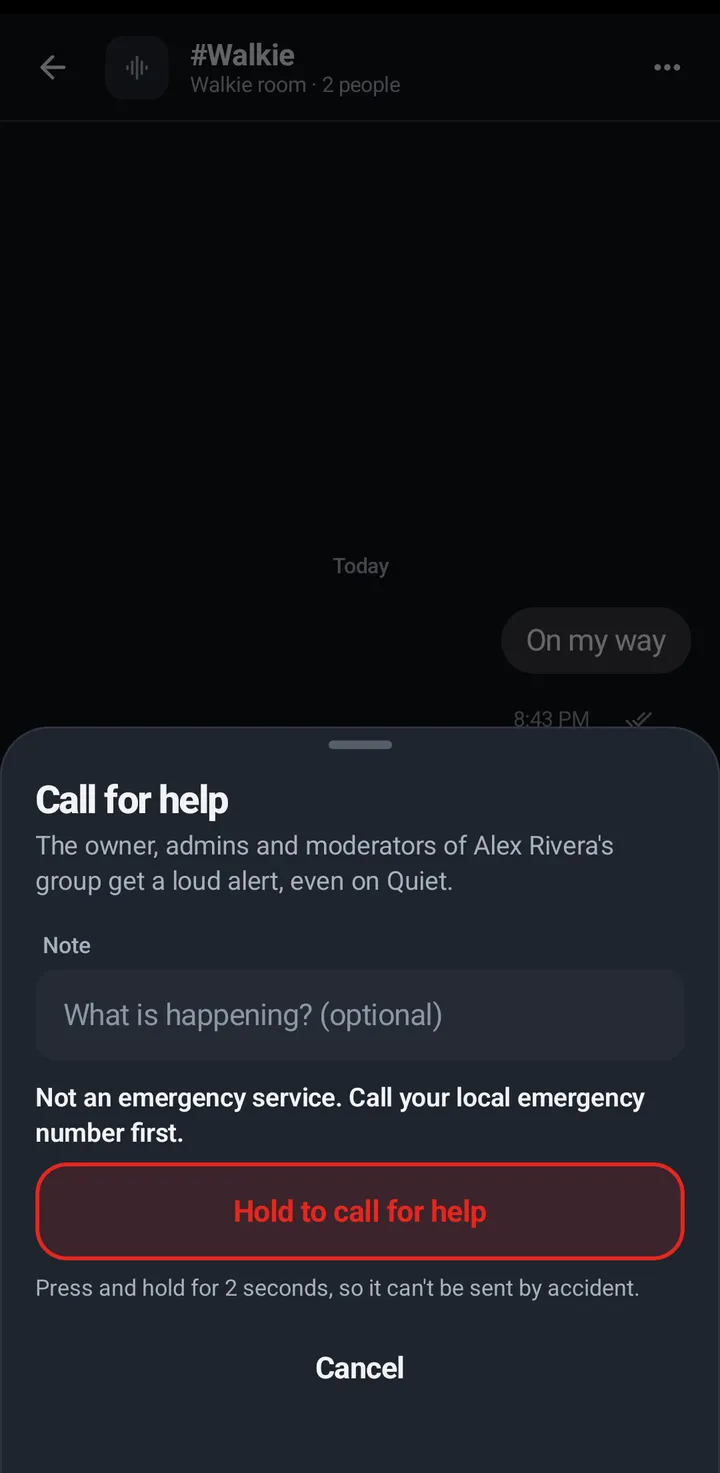
- In the room, tap the three dots (More for #room), then Call for help.
- The sheet says who gets it, for example “The owner, admins and moderators of Riverside Crew get a loud alert, even on Quiet.”
- Type a note if you want to (up to 140 characters): What is happening? (optional).
- Above the button the sheet says Not an emergency service. Call your local emergency number first.
- Press and hold Hold to call for help for 2 seconds. A quick tap sends nothing.
- The sheet says Sent to 3 people. If it was a mistake, tap It was a false alarm. The first tap only asks Tap again to say it was a false alarm; the second tap, within 4 seconds, withdraws the call. If nobody could be alerted it says Nobody could be alerted. If it is an emergency, call your local emergency number. and there is no false alarm button, because there is nobody to tell. The Talk tab then shows a red card, Nobody was alerted. Call your local emergency number., with Dismiss. It goes away when you tap Dismiss, when a later call reaches someone, or after 10 minutes. It never shows Your call for help is open for a call nobody received.
- If it can’t send, the sheet says so and names your local emergency number. With no connection at all it says No connection. Call your local emergency number. Holding again after a bad connection does not send a second alarm.
- Until someone handles it, your open call shows at the top of the Talk tab as Your call for help is open, with It was a false alarm. It takes two taps there too. After 10 minutes the same place says Mark as handled instead: one tap closes your call. Nothing is withdrawn, it only closes.
- If you close the sheet while your call is still open, KeyUp asks first: Your call for help is still open, with Keep it open and It was a false alarm (after 10 minutes, Keep it open and Mark as handled). Here one tap is enough, because the question is the check. Keep it open sends nothing and the call stays open. Your call is never left open without you choosing.
Watch
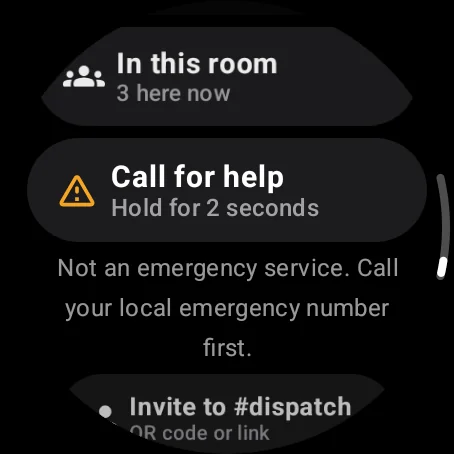
- Swipe up, then Actions › Call for help (it says Hold for 2 seconds).
- The screen says Not an emergency service. Call your local emergency number first.
- Keep holding until it says Sent to 3 people. A quick tap only shows the hint. The result shows as a whole sentence on its own, never cut, with Dismiss on its own row under it, and stays until you tap Dismiss. If nobody could be alerted it says so and the watch buzzes twice, and the talk screen keeps the line Nobody was alerted. Call your local emergency number. for 10 minutes or until you dismiss it. With no connection, a timeout or any other failure the result says why and names your local emergency number. The talk screen then shows the short form, No connection. Call your local emergency number. or Not sent. Call your local emergency number., and the full reason is in Controls. If the screen goes dark or you leave it while the call is sending, the watch still finishes the send and shows the result.
- If your call reached someone and you tap Dismiss while it is still open, the watch asks Your call for help is still open, with Keep it open and It was a false alarm (after 10 minutes, Mark as handled) as separate rows.
- On the talk screen, the call-for-help lines (Call for help sent · False alarm?, Nobody was alerted and a failed send) always show in full, never cut; while a long one shows, the talk button gets a little smaller to make room. They are information only. Nothing there can be tapped, so a press on the talk button never lands on them. At the top of Controls the result looks the same as right after sending: the sentence on its own, then Dismiss, then the Keep it open and close rows when the watch asks. To withdraw a call, swipe up to Controls: It was a false alarm is there for 10 minutes after you send, when the call reached someone. After that, Controls says Mark as handled (one tap) for as long as your call is open. The first tap changes it to Tap again to say it was a false alarm; the second tap, within 4 seconds, withdraws the call. A lone tap never does. The Nobody was alerted line has its Dismiss in Controls too.
Web app and iPhone
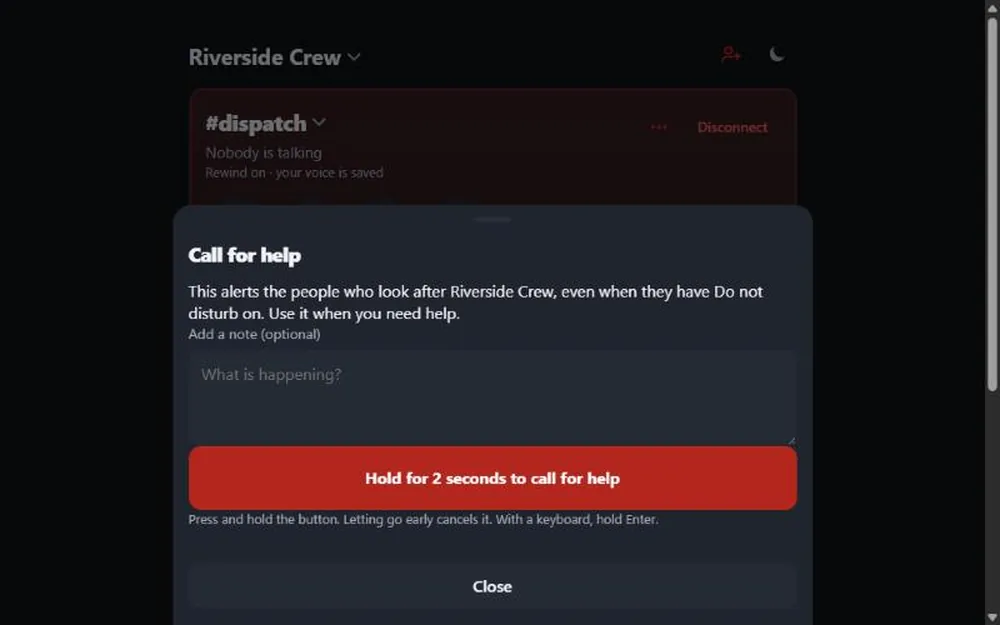
- Open Room settings (the three dots on the room card) and find Call for help.
- Add a note if you like. The sheet says Not an emergency service. Call your local emergency number first.
- Press and hold Hold for 2 seconds to call for help. With a keyboard, hold Enter. Letting go early cancels it. With a screen reader, a plain click shows Send it now.
- After it is sent to someone, It was a false alarm closes your call. It takes two clicks: the first says Tap again to say it was a false alarm, and the second, within 4 seconds, withdraws the call. If nobody could be alerted the sheet says Nobody was alerted. Call your local emergency number. and there is no false alarm button. With no connection the sheet says No connection. Call your local emergency number.
- If you close the sheet, the room screen shows a card, Your call for help is open, with the same two-click It was a false alarm for 10 minutes and Mark as handled (one click) after that. The card stays while the call is open, even if you reload the page. A call that reached nobody never shows that card.
- If you close the sheet while your call is still open, KeyUp asks first: Your call for help is still open, with Keep it open and It was a false alarm (after 10 minutes, Keep it open and Mark as handled). One click is enough there, because the question is the check. Keep it open sends nothing, and the card stays.
- If KeyUp does not answer within 10 seconds, the sheet stops waiting and says Couldn’t confirm your call for help. If it is an emergency, call your local emergency number. The button works again, and holding it again in the same sheet within 2 minutes does not send a second alert.
Still stuck? Email [email protected]. Tell us your phone and watch model and what you tried.