Keep a copy of talks: turn Replay on in a room
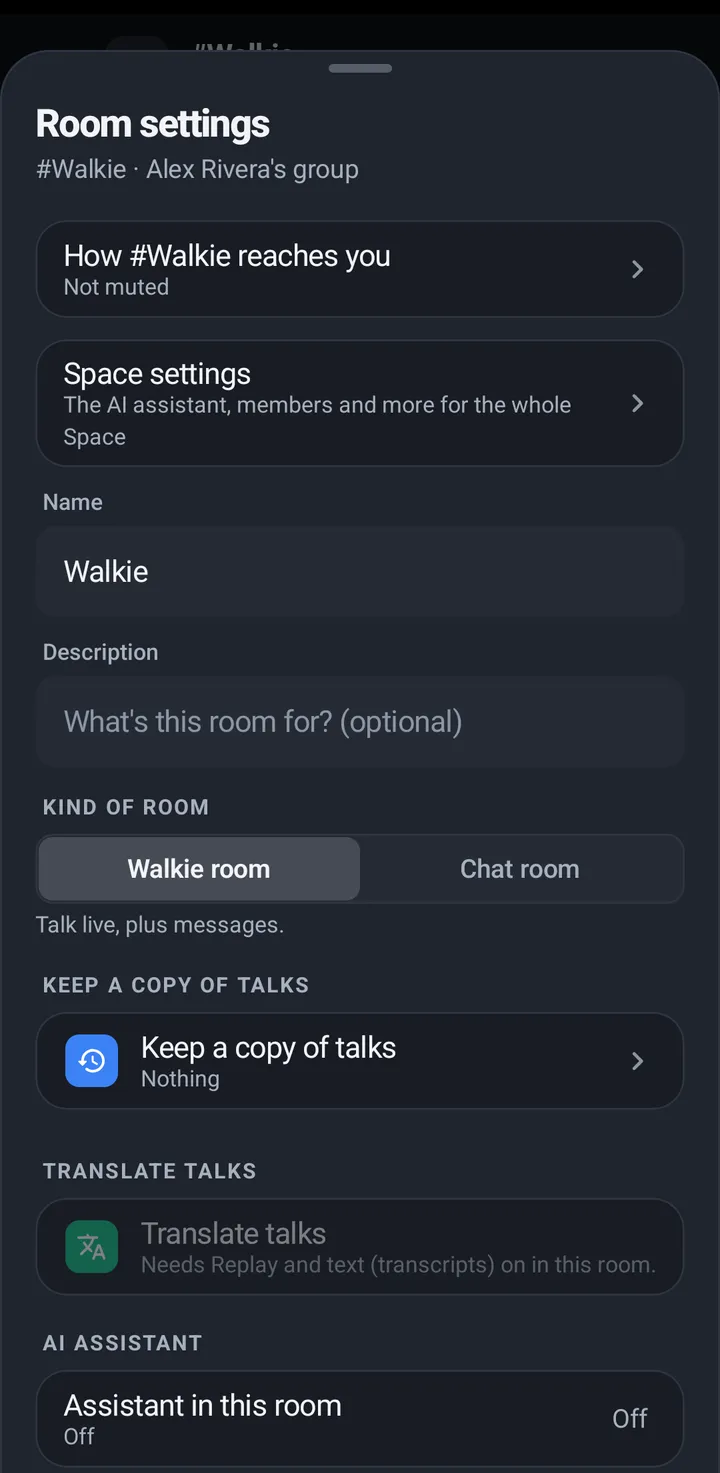
A room can keep a copy of talks: Nothing, Voice clips, or Voice and text, with how long each is kept. Your voice is saved only if you say yes.
Replay lets a room keep short voice clips, so people can play back what was said. Each room has one choice, Keep a copy of talks, and it is Nothing in every new room. Your voice is saved only if you say yes, and guests are never recorded. People hear you live either way. Replay plays only for you. (Separate from Replay: a talk you missed because your connection dropped is played to you when you are back; see below.)
Keep a copy of talks (owners and admins)
One row opens one sheet. Three choices: Nothing, Voice clips (Replay) and Voice and text (the clips and a written copy), and under them both keep times: Keep clips for and Keep transcripts for, up to what your plan allows. The same people who change the room’s other settings can change it. Voice and text needs a plan with transcripts, or Plus or a bigger plan with the Space’s own transcription key. Without one, members don’t see it, and owners and admins in the Android app and the web app see it greyed with Available on Crew. Choosing Nothing offers Delete saved copies, and nothing is deleted until you tap it. A room that keeps text without clips shows Text only and keeps it. The separate Replay and Transcripts switches under Advanced are gone: everything is in this sheet. On an older version of KeyUp the choices are called Off, Replay the last hour and Replay and text.
Phone
- Open Room settings (the gear) and tap Keep a copy of talks. Pick Nothing, Voice clips or Voice and text.
- In the same sheet, set Keep clips for (1 hour, 1 day, 7 days, 30 days or 90 days) and, with text, Keep transcripts for, up to what the plan allows.
- Choosing Nothing offers Delete saved copies.
Watch
Set this on the phone.
Web app and iPhone
Room settings (three dots) › Keep a copy of talks, with the same three choices and both keep times.
Your choice
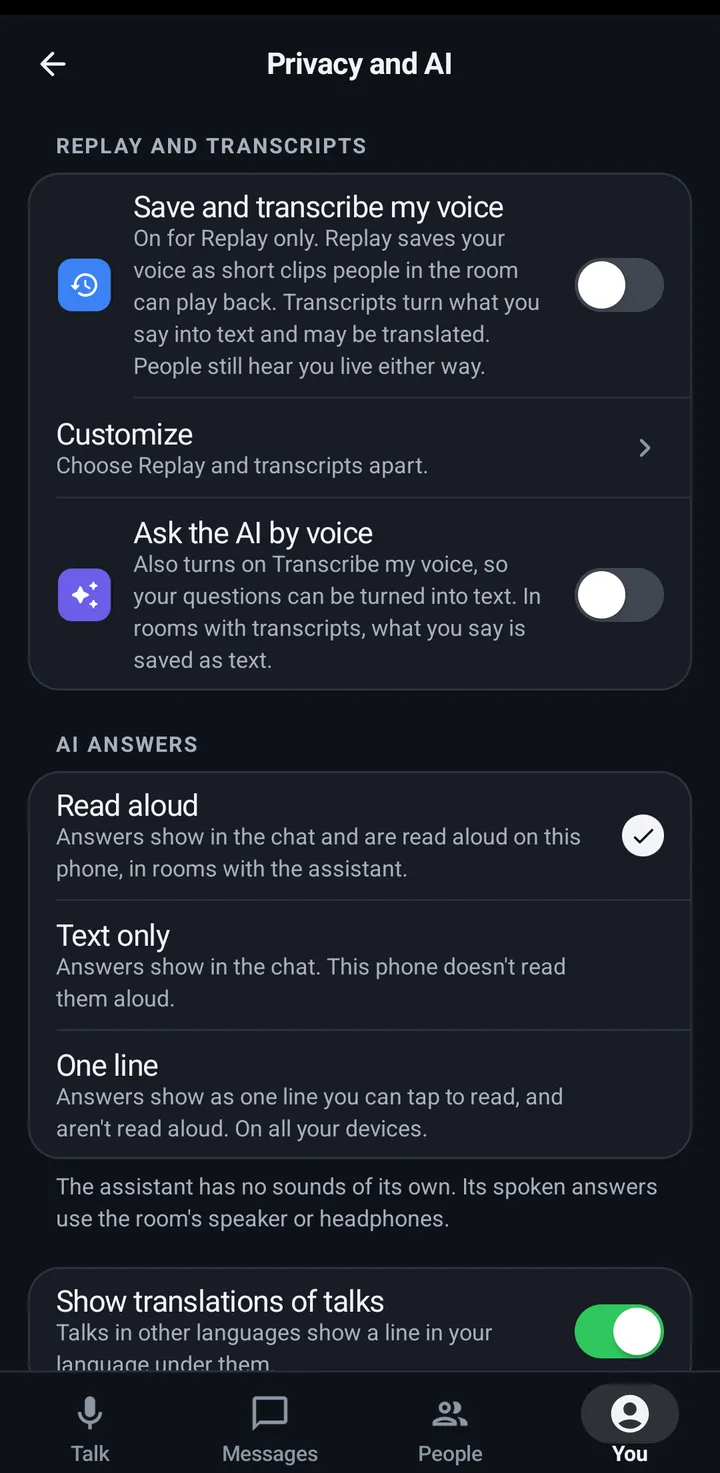
One account switch covers both effects: Save and transcribe my voice. When you turn it on, KeyUp tells you what it means: “Replay saves your voice as short clips people in the room can play back. Transcripts turn what you say into text and may be translated. People still hear you live either way.” Turning it off takes both back. It agrees to KeyUp’s own transcripts only. A Space that uses its own transcription provider asks you separately, and names the provider. If only one half is on, for example because you turned on Ask the AI by voice, the switch shows off with On for text only. or On for Replay only. under it. Tap it to turn both on. The two halves apart are under Customize, inside the switch: Save my voice for Replay and Transcribe my voice. A guest pass account never sees any of this and is never recorded.
Phone
- You › Privacy and AI › Save and transcribe my voice.
- Customize, inside it, has Save my voice for Replay and Transcribe my voice as two separate switches.
Watch
Settings › You › Privacy › Save and transcribe my voice. The two apart are under Advanced there.
Web app and iPhone
You › Privacy and AI › Save and transcribe my voice. The two apart are under Customize there.
The question in a room
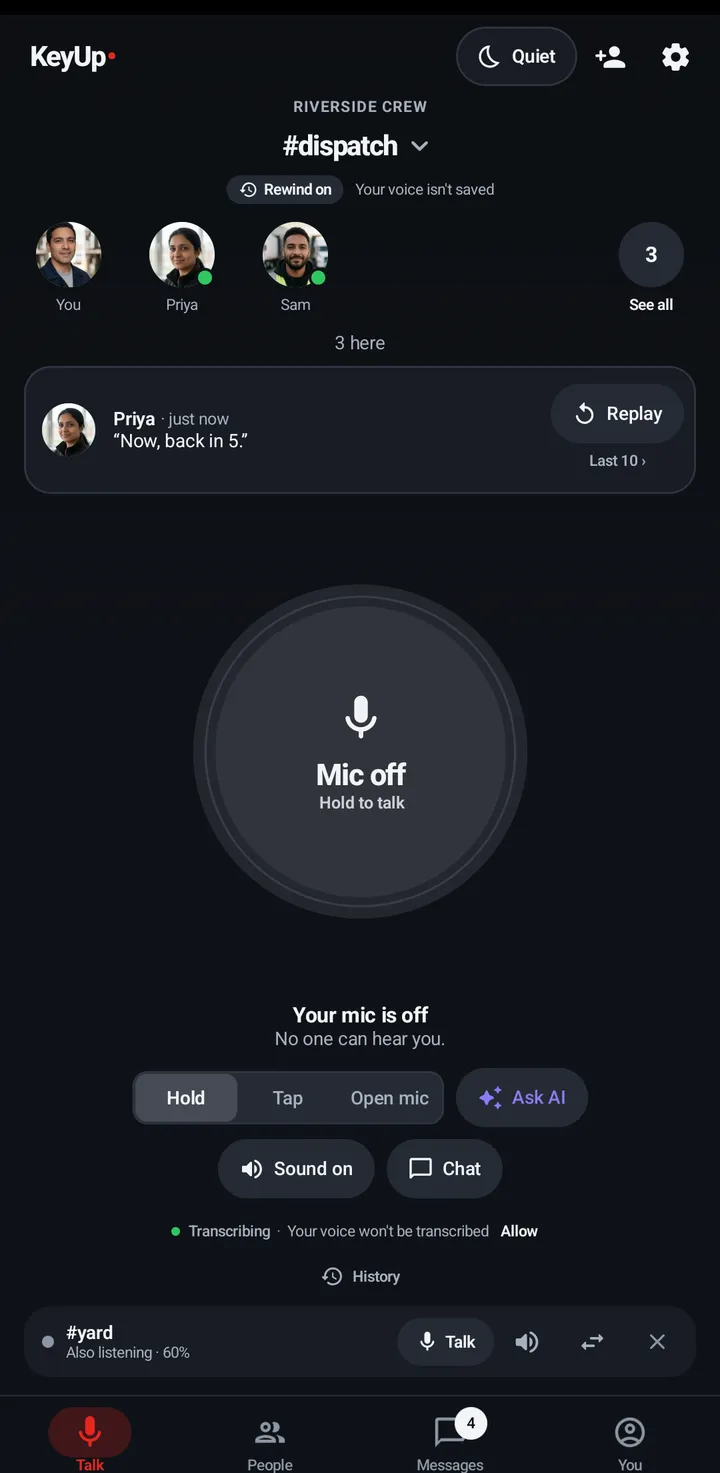
A room asks once, and only about what it really does. A room that keeps voice clips only asks Save my voice for Replay?. A room with voice and text asks Save and transcribe my voice?. Yes turns on the matching account switches. Not now leaves them off, and nothing is saved of your voice.
Phone
- In a room with Replay on you see Replay on with Your voice is saved or Your voice isn’t saved, and once the question with Yes or Not now. Your answer is remembered for your account on this device, also after you sign out and back in.
- If you just turned Replay on in Room settings, the question comes when you close Room settings.
- Change it any time in You › Privacy and AI.
Watch
The same question and line show in swipe up › In this room. The question chip says Tap for yes. You’re heard live either way. and a Not now chip sits under it; tapping either one answers it.
Web app and iPhone
The room card shows Replay on with the one-time question. Change your answer in You › Privacy and AI.
Still stuck? Email [email protected]. Tell us your phone and watch model and what you tried.