Watch: Mute and read, talk screen icons and Deep sleep
Silence the watch and read talks as words, choose the two icons beside the talk button, and save battery while Quiet is on.
Three watch settings that go with Quiet: Mute and read silences the watch and shows talks as words, the talk screen icons put the controls you use beside the talk button, and Deep sleep during Quiet saves battery while the watch is quiet.
Mute and read (watch)
Mute and read sets Sound on this watch to Off. It silences this watch, while leaving your phone’s Sound setting alone. Each talk shows on the talk screen, or as a notification when KeyUp isn’t on screen, with one buzz: the words when the room has transcripts, or “Sam talked” when it does not. The one exception: while your phone (or another device of yours) is playing the room, the watch stays quiet and the words stay on its talk screen, with no buzz and no notification. The talk screen says Sound off here · your phone plays it then, and Sound off here · talks show as words when nobody plays it.
Watch
- Tap the Mute and read icon to the left of the talk button (the default). KeyUp says Muted here. New talks show as words.
- While your phone hears the room, the watch shows the words on its talk screen with no buzz and sends no notification.
- Tap a talk’s card to open What was said. Written talks need transcripts in the room and the speaker’s permission. See Transcripts for plans and setup.
- When KeyUp isn’t on screen (the screen is off, or you are on the watch face, in another app or on another KeyUp screen), each talk comes as a watch notification instead, like Sam in #dispatch with the words or “Sam talked”. It buzzes once and makes no sound. Tap it to open What was said.
- Each talk is the card or the notification, never both. A new talk in the same room replaces the notification, and it clears when you open the room. Quiet, your mutes and your notification levels apply, as for KeyUp’s other notifications.
- On a locked screen set to hide private notification content, the notification shows only who and where, like Sam in #dispatch and “Sam talked”, never the words.
- Tap the icon again, or connect headphones to this watch, to restore the Sound setting it replaced. The note says Sound back on this watch.
- If you changed the icons, pick Mute and read again in Settings › How you talk › Talk screen icons.
- You can also switch Mute and read from your watch face: add the KeyUp Sound complication. See Watch tiles and complication.
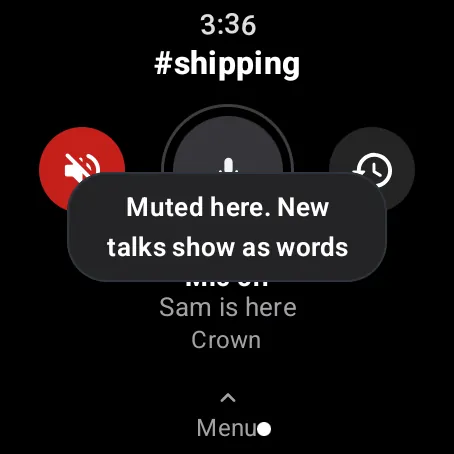
Choose the talk screen icons
Watch
- Swipe up, then open Settings › How you talk › Talk screen icons.
- Tap Left icon or Right icon to move to the next choice: Mute and read, What was said, Volume, Quiet 1 hour, Replay last, Messages or None.
- The choice already on the other side is skipped, except None, which can hide both icons. These choices apply to this watch only.
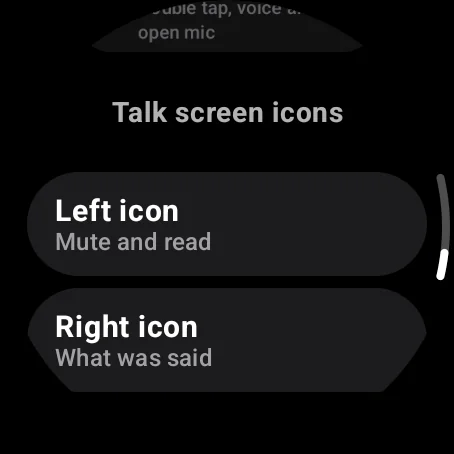
Deep sleep during Quiet (watch)
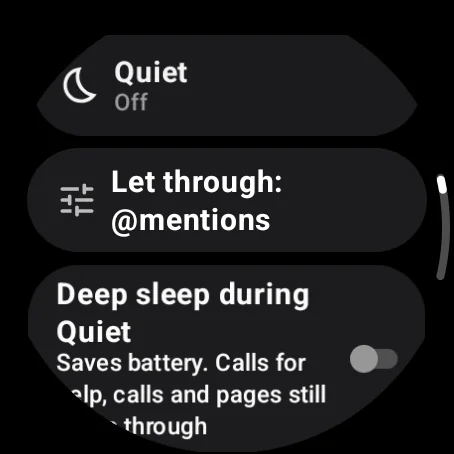
Deep sleep during Quiet saves watch battery by stopping its regular check-ins while KeyUp is closed and Quiet is on, Bedtime mode is on or you are off in the room you are in. That room decides: a planned time off (for this room or all rooms), an Off you set with its end time, then the room’s own setting (Always on, My schedule, Custom, Follow room hours in the room’s time zone, or Off). The switch says “Saves battery. During Quiet, Bedtime and while you’re off in the room you’re in, this watch stops checking in. Calls for help, calls and pages still come through. Talks wait in Replay and What was said.” It is off by default. Calls for help, calls and pages still come through. Voices of people you let through Quiet do not play while the watch is asleep.
Watch
- Swipe up, then open Quiet › Deep sleep during Quiet and turn it on if you want this watch to sleep during those quiet times.
- Talks wait in Replay and What was said, when the room keeps clips or transcripts. The room’s keep time, the plan and the speaker’s permission still apply.
- The watch wakes when the quiet period ends, within about 15 minutes. Opening KeyUp wakes it right away. Starting a talk wakes it too; the talk starts a moment later, once connected.
- Turning the crown on a sleeping watch wakes it. It shows Waking up, then arms and goes live only on your voice, as a normal crown talk. Turn the crown back before that and the start is cancelled.
Still stuck? Email [email protected]. Tell us your phone and watch model and what you tried.